
Powerpop AI-Based Targeting Tutorial
Powerpop’s AI-driven targeting evaluates visitor engagement on your site, automatically identifying casual browsers, interested visitors, and hot leads. It works across categories, brands, and individual products, replacing traditional one-size-fits-all targeting methods.
The AI determines:
- Visitor’s predicted intent
- Visitor’s engagement with a specific product by ID
- Visitor’s engagement with a product category
- Visitor’s engagement with a product brand

Key Feature: The AI calculates engagement based on patterns from all visitors, not fixed rules like “visited page twice = interested.”
Step 1: Open Your Campaign
- Log in to Powerpop.

- Navigate to Campaigns.
- Either create a new campaign or edit an existing one.

Step 2: Open the Workflow Section
- Open the Powerpop Editor and go to the Workflow section in your editor.


- Click on Conditions to adjust settings.

Step 3: Set Up the AI Filter
Click Custom Conditions.
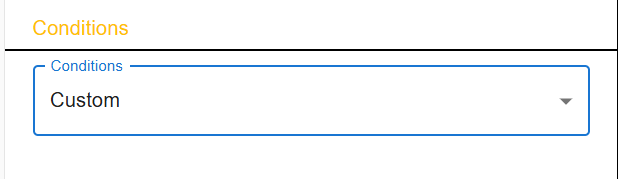
Conditions - Custom Define your target based on:
- Product ID
- Product category
Product brand
Example Setup: Targeting visitors who are not subscribed to the newsletter and are interested in a specific product category.
- Condition 1: Newsletter subscription status → Not subscribed

- Click X Button and Add Condition 2: Visitor’s interest in product category → Matches any
- Category Name:
handbags - Check: Flexible match
- Category Name:

Flexible Match Explanation:
- The AI allows partial matches.
- For example, typing
handwill matchhandbagsorhandcrafted bags.

Match Options:
- Matches Any: Targets visitors matching any of the selected values
- Matches None: Targets visitors who do not match any of the selected values

Additional Example:
- Targeting the category
lipedemworks the same way:- Category Name:
lipedem - Flexible match: enabled
- Category Name:

Step 4: Launch and Monitor
- Save and activate your campaign.
- Monitor campaign performance in Analytics, tracking engagement across categories, brands, and products.
- Adjust targeting based on results — the AI continuously refines engagement scoring.
Understanding AI Engagement Levels & Segmentation
How the AI Works
Powerpop evaluates visitor engagement with:
- Product categories
- Brands
- Individual products (product IDs)
The AI assigns engagement levels automatically, based on patterns observed across all visitors, instead of relying on fixed rules like “visited page twice” or “spent 5 minutes on a page.”
AI-Defined Engagement Levels
There are three engagement levels:
| Level | Description |
|---|---|
| browsing | Visitor viewed the category/brand/product but is not likely a hot lead |
| interested | Visitor viewed the category/brand/product and shows higher engagement than most visitors |
| hotLead | Visitor shows strong interest in a category, brand, or product |
Example: Targeting the
lipedemcategory
lipedem::browsing– visitor has low engagementlipedem::interested– visitor shows above-average engagementlipedem::hotLead– visitor shows very high engagement
Key point: You don’t need to manually define thresholds like “viewed >2 pages” or “spent >5 minutes.” Powerpop’s AI determines these automatically for each category, brand, and product.
Simplified Targeting Filters
Powerpop recently simplified filters, making it easier to target based on engagement:
- Any interest: Targets visitors with any level of engagement in the selected category/brand/product.
- At least some interest: AI decides what “some interest” means automatically.
- High interest: Targets visitors with strong engagement (hotLead).
This AI engagement analysis can be used in all supported segmentation rules:
- Visitor's predicted intent
- Visitor’s interest in product by ID
- Visitor’s interest in product category
- Visitor’s interest in product brand

Targeting Specific Interest Levels
Refine targeting using the following syntax:
| Example Value | Meaning |
|---|---|
handbags |
Any engagement level |
handbags::browsing |
Only visitors with low engagement |
handbags::interested |
Visitors with medium engagement |
handbags::hotLead |
Visitors with strong engagement / intent |
Use just the category name to target all levels. Use the full syntax (e.g.,
handbags::hotLead) for a specific level.
Example Scenarios
| Scenario | Target Setup | Description |
|---|---|---|
| Any engagement with category “handbags” | handbags |
Broad awareness targeting |
| Strong engagement (hot leads) | handbags::hotLead |
Conversion-focused remarketing |
| Medium engagement with category “lipedem” | lipedem::interested |
Category-focused mid-funnel campaigns |
| Strong engagement with product ID 12345 | 12345::hotLead |
Product-level retargeting |
Advantages of AI-Based Targeting
- Visitors show different engagement across site sections, categories, brands, or products.
- One-size-fits-all targeting is obsolete and ineffective — e.g., assuming a visitor is interested just because they visited a page twice.
- Powerpop’s AI-driven engine evaluates engagement based on similarities with other visitors, dynamically updating each visitor’s engagement level.
- Engagement levels are adaptive, not static, ensuring precise targeting for each visitor.
Summary
Powerpop’s AI-driven engagement analytics make targeting:
- Smarter – learns from real visitor engagement
- Adaptive – unique per category, brand, and product
- Automatic – no manual thresholds needed
- Effective – improves campaign precision and conversions
Key Takeaway: Powerpop’s AI engine automatically identifies engagement levels per visitor and category — letting you target the right users, at the right time, with the right message.
Related Articles:
- Refresh your knowledge on applying workflows: Powerpop Editor Workflow
- Explore a practical example of a campaign delivering unique coupons: Implementation Guide – Scenario 1: Unique Coupons